Showing posts with label Google. Show all posts

Wednesday, 22 February 2017

,

Writing Custom Lint for Android Studio

Post By - Tanmay | 2/22/2017 03:05:00 am


Android lints are used to analyze your code for correctness, performance, security, typography and usability; and it has proven itself useful from time to time. In an android studio, there are already some predefined lint rules, which checks for spelling mistakes, possible bugs, performance wise customisations etc., but to follow a standard within a team, we need custom lint rules.


e.g.: in some projects, developers are asked to use a utility class to access SharedPreference, but few of them create a new instance of it every time. To check such thing, we create custom lint rules.

Reference: This post is an extension to Matt Compton’s post Building Custom Lint Checks in Android. In this post, I will just mention few steps to create a custom lint rule. Please refer to Matt’s post for a complete overview.

For making custom lint rules, you need a separate project, you can, fork this git repository, and follow steps to create a rule.

  1. To create a lint rule, create a class in detectors package, name it SharedPreferenceClass
  2. We are going to make the rule mentioned in the example, so, we need to check the uses of SharedPreferences.Editor everywhere except Utils.java

  3. Extend Detector class and implement Detector.JavaScanner (because we’re going to scan through all the Java files. You can also implement ClassScanner and XmlScanner, based on your requirement. The class will look something like this:


     public class SharedPreferenceDetector extends Detector implements Detector.JavaScanner {  
     }  
    

  4. Define the string you want to search for

     private static final String SP_MATCHER_STRING = "SharedPreferences.Editor";  


  5. For implementing the issue tracker, we need to define detector class and scope.

     private static final Class<? extends Detector> DETECTOR_CLASS = SharedPreferenceDetector.class;  
     private static final EnumSet<Scope> DETECTOR_SCOPE = Scope.JAVA_FILE_SCOPE;  


    Detector class is, you can say the engine, and scope is where we want to search. You can search
    1. JAVA_FILE
    2. RESOURCE_FILE
    3. RESOURCE_FOLDER
    4. GRADLE etc.

      We are going to search for JAVA_FILE_SCOPE

  6. Initialise the implementation:

     private static final Implementation IMPLEMENTATION = new Implementation( DETECTOR_CLASS, DETECTOR_SCOPE );  
    

  7. Now you need to define Issue properties, for example, we need 

     private static final String ISSUE_ID = "SharedPreferenceUtils";  
     private static final String ISSUE_DESCRIPTION = "Shared Preference Class Used";  
     private static final String ISSUE_EXPLANATION = "Using the Shared Preference Class is not secure. Consider using our Utils.java for such purpose";  
     private static final Category ISSUE_CATEGORY = Category.CORRECTNESS;  
     private static final int ISSUE_PRIORITY = 8;  
     private static final Severity ISSUE_SEVERITY = Severity.WARNING;  
    

    1. ISSUE_ID should be always unique
      ISSUE_DESCRIPTION, the title you want to display
      ISSUE_EXPLANATION, message you want to display
      ISSUE_CATEGORY, same I mentioned earlier, I am choosing it to be correctness
      ISSUE_PRIORITY, it is self-explanatory
      ISSUE_SEVERITY, there are FATAL, WARNING, ERROR, INFORMATION, IGNORE
    2. Now create an ISSUE object:
      1. public static final Issue ISSUE = Issue.create(
      2.             ISSUE_ID,
      3.             ISSUE_DESCRIPTION,
      4.             ISSUE_EXPLANATION,
      5.             ISSUE_CATEGORY,
      6.             ISSUE_PRIORITY,
      7.             ISSUE_SEVERITY,
      8.             IMPLEMENTATION
      9.     );
    3. Create a constructor of course,

       public SharedPreferenceDetector() {}  


    4. getApplicableNodeTypes() is used to check the object type.

       @Override  
         public List<Class<? extends Node>> getApplicableNodeTypes() {  
           return null;  
         }  
      
    5. There is an appliesTo method in the code you forked. Please read this issue tracker post. “appliesTo is a leftover from the beginning of lint when it was just passing through the project, file by file, and letting each detector take a look at the file.”

      So, I am leaving appliesTo method out of the code.


    6. The fun part: we will create a java visitor by overriding the method from JavaScanner interface, and using context.file.getName()  we will match if file is Utils.java, don’t scan it

Now, we need to register it with CustomIssueRegistry. Add your detector in already present Issue array. The complete SharedPreferenceDetector.java will be:


 import com.android.annotations.NonNull;  
 import com.android.ddmlib.Log;  
 import com.android.tools.lint.detector.api.Category;  
 import com.android.tools.lint.detector.api.Context;  
 import com.android.tools.lint.detector.api.Detector;  
 import com.android.tools.lint.detector.api.Implementation;  
 import com.android.tools.lint.detector.api.Issue;  
 import com.android.tools.lint.detector.api.JavaContext;  
 import com.android.tools.lint.detector.api.Location;  
 import com.android.tools.lint.detector.api.Scope;  
 import com.android.tools.lint.detector.api.Severity;  
 import com.android.tools.lint.detector.api.TextFormat;  
 import java.io.File;  
 import java.util.EnumSet;  
 import java.util.List;  
 import lombok.ast.AstVisitor;  
 import lombok.ast.Node;  
 /**  
  * Created by tanmaybaranwal on 21/02/17.  
  */  
 public class SharedPreferenceDetector extends Detector implements Detector.JavaScanner {  
   private static final String SP_MATCHER_STRING = "SharedPreferences.Editor";  
   private static final Class<? extends Detector> DETECTOR_CLASS = SharedPreferenceDetector.class;  
   private static final EnumSet<Scope> DETECTOR_SCOPE = Scope.JAVA_FILE_SCOPE;  
   public static String fileName;  
   private static final Implementation IMPLEMENTATION = new Implementation(  
       DETECTOR_CLASS,  
       DETECTOR_SCOPE  
   );  
   private static final String ISSUE_ID = "SharedPreferenceUtils";  
   private static final String ISSUE_DESCRIPTION = "Shared Preference Class Used";  
   private static final String ISSUE_EXPLANATION = "Using the Shared Preference Class is not secure. Consider using our Utils.java for such purpose";  
   private static final Category ISSUE_CATEGORY = Category.CORRECTNESS;  
   private static final int ISSUE_PRIORITY = 8;  
   private static final Severity ISSUE_SEVERITY = Severity.WARNING;  
   public static final Issue ISSUE = Issue.create(  
       ISSUE_ID,  
       ISSUE_DESCRIPTION,  
       ISSUE_EXPLANATION,  
       ISSUE_CATEGORY,  
       ISSUE_PRIORITY,  
       ISSUE_SEVERITY,  
       IMPLEMENTATION  
   );  
   /**  
    * Constructs a new {@link SharedPreferenceDetector} check  
    */  
   public SharedPreferenceDetector() {  
   }  
   @Override  
   public List<Class<? extends Node>> getApplicableNodeTypes() {  
     return null;  
   }  
   @Override  
   public AstVisitor createJavaVisitor(@NonNull JavaContext context) {  
     String source = context.getContents();  
     //Leave the Utils.java file  
     if(context.file.getName().equals("Utils.java")){  
       return null;  
     }  
     // Check validity of source  
     if (source == null) {  
       return null;  
     }  
     // Check for uses of to-dos  
     int index = source.indexOf(SP_MATCHER_STRING);  
     for (int i = index; i >= 0; i = source.indexOf(SP_MATCHER_STRING, i + 1)) {  
       Location location = Location.create(context.file, source, i, i + SP_MATCHER_STRING.length());  
       context.report(ISSUE, location, ISSUE.getBriefDescription(TextFormat.TEXT));  
     }  
     return null;  
   }  
 }  


To test the detector, we need a test file. The repo contains a package named test, you can make a class in that like this one. (Please find comments to understand the modules).


 package com.bignerdranch.linette.detectors;  
 import com.android.tools.lint.detector.api.Detector;  
 import com.android.tools.lint.detector.api.Issue;  
 import com.android.tools.lint.detector.api.TextFormat;  
 import com.bignerdranch.linette.AbstractDetectorTest;  
 import java.util.Arrays;  
 import java.util.List;  
 /**  
  * Created by tanmaybaranwal on 21/02/17.  
  */  
 public class SharedPreferenceDetectorTest extends AbstractDetectorTest{  
   @Override  
   protected Detector getDetector() {  
     return new SharedPreferenceDetector();  
   }  
   @Override  
   protected List<Issue> getIssues() {  
     return Arrays.asList(SharedPreferenceDetector.ISSUE);  
   }  
   @Override  
   protected String getTestResourceDirectory() {  
     return "shared";  
   }  
   /**  
    * Test that an empty java file has no warnings.  
    */  
   public void testEmptyCase() throws Exception {  
     String file = "EmptyTestCase.java";  
     assertEquals(  
         NO_WARNINGS,  
         lintFiles(file)  
     );  
   }  
   /**  
    * Test that an Utils.java java file has no warnings.  
    */  
   public void testUtilsCase() throws Exception {  
     String file = "Utils.java";  
     assertEquals(  
         NO_WARNINGS,  
         lintFiles(file)  
     );  
   }  
   /**  
    * Test that a java file with a to-do has a warning.  
    */  
   public void testSharedPrefCase() throws Exception {  
     String file = "SharedPreferenceTestCase.java";  
     String warningMessage = file  
         + ":7: Warning: "  
         + SharedPreferenceDetector.ISSUE.getBriefDescription(TextFormat.TEXT)  
         + " ["  
         + SharedPreferenceDetector.ISSUE.getId()  
         + "]\n"  
         + "  SharedPreferences.Editor editor = mSharedPreferences.edit();\n"  
         + "  ~~~~~~~~~~~~~~~~~~~~~~~~\n"  
         + "0 errors, 1 warnings\n";  
     assertEquals(  
         warningMessage,  
         lintFiles(file)  
     );  
   }  
 }  


Run the lint:

  1. for MacOS users, open terminal in the android studio, do $chmod 755 gradlew
  2. $ ./gradlew clean build test install

You will be able to check the success report in the logged link. To check it

  1. Open terminal
  2. Set the path at SDK/tools
  3. lint ——show <issue_id>

To include lint in a project separately

  1. navigate to /Users/<user_name>/.android/lint/<file.jar>
  2. Copy the jar file, paste it in the lib folder of your project
  3. Add the file dependency in app’s build.gradle
  4. In the gradle, write the lint options:
     lintOptions{  
         abortOnError false //if build has to abort  
         check ‘SharedPreferenceUtils' //to check one custom rule  
         showAll true //show report  
         textReport true  
         textOutput ‘stdout' //shows report in message  
       }  
    

  1. Run the lint using $ ./gradlew lint


While building the project, I got “Error: Error converting bytecode to dex: Cause: Dex cannot parse version 52 bytecode.”. To overcome this, compile your lint project with Java 1.7 to do so, add 

 apply plugin: 'jacoco'  
 dependencies{  
  sourceCompatibility = 1.7  
   targetCompatibility = 1.7  
 }  


in the gradle of lint project.


Thursday, 11 June 2015

An amazing thought becoming reality : Project Jacquard.

Post By - Unknown | 6/11/2015 04:59:00 am

Hi Everyone..!!

What you will do ,if   suppose  you are busy and your phone is ringing quite far away from you  & you want to reject the call or pick it up  or if  you want to increase the volume while watching movie from your phone placed at some distance.  How will you do it ??
   Your answer would be , that obviously you will go and pick the call or reject the call as you do always. But i would say that soon  operating your phone manually, would just be an option for you.
 Getting restless to know how..?? I will be giving you answer for this later in this post.  

  Actually, i'm going to introduce you a little  about the "Project Jacquard ", that has been announced by the Google this year at its annual developer conference  'I/O ' , held at San Francisco(United States).This is a very unique concept , founded by  Ivan Poupyrev ,one of the team members of Google's ATAP team. The project is going to innovate the product of textile industry, that is our clothes.

  This project involves manufacturing of a conductive yarn , that is done by braiding together the metal alloys and the fibers of some fabric. This  conductive yarn helps to create a kind of fabric panels ( a touch sensitive panel same as screen of your smart phones) which act as an interface to interact with  a digital device such as a smart phones or tablets. We can operate our smart devices using their controls with the help of this conductive yarn.

  What happens is that when we touches a grid made up conductive threads , it automatically sends a signal to a chip which may  be located somewhere in our clothes. That chip then translates those signals into  controls for the devices such as smart phones.
    Now i will answer the question i've asked above .Using this technology , you can pick a call or increase volume  of your phone without even touching it.What you need to do is just rub your sleevs....;)

   The company Google wants to make this project scalable , along with making the products trendy as well as fashionable.Google wants to make it available for all using existing clothing brands.The name Jacquard is chosen for this project , after the name of  Joseph Marie Jacquard, the inventor of Jacquard weaving process.


   One of the major advantage is that the conductive metal alloys can be woven into any type of fabric using normal industrial looms. We can also choose desired color of yarn. Also the yarn seems so natural though very strong in nature. The chip i've talked about that receives signals is very compact in size equal to that of a blazer's button.It's embedded with the circuits & connectors.


Mr. Poupyrev  showcased a prototype , that is a blazer at I/O 2015. In 2016 Google can launch its products based on project Jacquard in collaboration with Levi Strauss & Co. This company will take the charge of manufacturing the garments only. Technically it will be handled by Google.
   The development of the  platform or environment for Jacquard  is under progress, according to the Jacquard Website.

In the end , i would say that after smart phones, smart cars, smart homes, smart gadgets, smart kitchens.......we will all have smart clothes. Thanks Google.


Thursday, 14 May 2015

Google I/O Extended 2015

Post By - Unknown | 5/14/2015 09:36:00 am
Hii Everyone,
This time i am sharing with you all an opportunity to be a part of a mega event . I am talking about I/O Extended 2015 that is being hosted by GDG Jalandhar, in collaboration with GSA's and GBG's of north region, at Chandigarh on 28thMay,2015.
Google I/O is an annual developer conference held by Google in San Francisco, California. Google I/O is a highly technical developers conference. Focuses on building web, mobile, and enterprise applications.

Google I/O Extended  events include live streamed sessions, local developer demos,hackathon and more.This is really going to be a great opportunity for the students and tech enthusiast to witness newest and exciting technologies.

Venue : Chitkara International School, Sector 25, Chandigarh ( Punjab )
Register yourself here  I/O Extended 2015 CHANDIGARH.

Note: No registration fee and Swags will be given to all attendees.
   

Wednesday, 6 May 2015

Big bang with the launch of Google's Cloud Bigtable.

Post By - Unknown | 5/06/2015 07:58:00 am
 Yeah, its about  Google's recently launched database service that is  highly efficient ,full-fledged database ever, as its performance is enhanced and has become extremely scalable No SQL database.
This service is easily accessible through industry standard open source, that is Apache HBase API.So, this service is offering a tremendous opportunity for the concerned  geeks of  Enterprise industry who handles the databases by working for hours to manage the complex and  huge amount of data.

   This technology offered by Google , the Google Cloud Bigtable  proves its excellence by its extra ordinary capabilities of handling huge volumes of complex data at quite fast pace. Its capabilties of  handling complex analytic procedures,  large ingestion of data ,and also data-heavy serving workloads are at their  best.
   The compatibility of Cloud Bigtable with Google's Bigtable data storage system(distributed system for dealing with structured data) with Apache Hbase API , is the main blend of Google's major technologies . It aslo comes under the Google's  Bigtable Project ,that is already handling many  projects at Google Store including Web indexing, Google Earth and Google Finance.Such applications lay demands in terms of dta size and latency requirements.But Bigtable  has provided a flexible and fast processing solutions to all these requirements.
  It's an ideal service for enterprising industries and data-driven organizations that need to handle volumes of data, including business oriented organizations  in the financial services, in  AdTech, also in  biomedical industries and  telecommunication industries.So, now time to talk about the special benefits:
png;base64f1e982d227e3a1a8
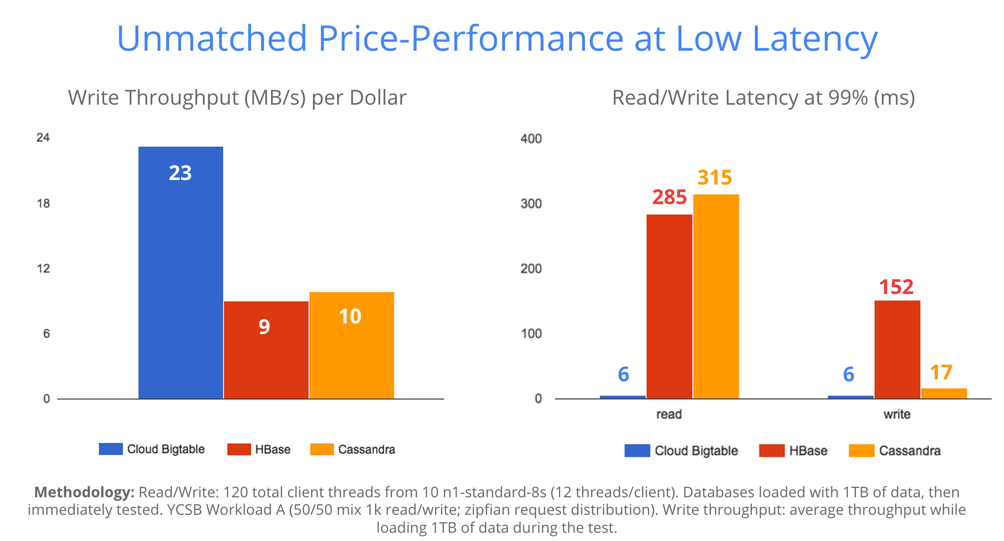
  • Perfomance scale: Minimum latency  (Just unit digit millisecond latency).
  • Security : In this a kind of  replicated storage schema or procedure is used and all data is encrypted twice, both in-flight and at rest.
  • Cost: The  total cost of  having   Bigtable is almost less than half the cost of its direct companions.
  • Open Source Interface: Because it is accessed using Apache HBase.
  • Simplicity:Creation or reconfiguration  the cluster is achieved through a simple user interface and can be done in less than 10 sec. 
  • and many more.


For now, this  new service is available for developers only that is in beta form,  but isn’t offering an SLA or technical support yet.


Thursday, 5 February 2015

,

HOW ? Google's Take on TIps and Tricks, by .HOW

Post By - Tanmay | 2/05/2015 06:50:00 am


Going to build a HOW TO or TIPS & TRICK blog. No ? Might be searching for "How to do ___" ? Many Websites, Confused ?
Cheer Up, Google is making it easy for you with its .HOW domains.

Google targets all the knowledge sharing website under on roof (domain) so that it'll be easier for everyone to search for "how's" in every form.

So,if you're interested, go buy one for your company or yourself (in case if you want to share something) and let it be as it could be one of it's first type.

Source : Google and Your Business

Sunday, 1 February 2015

3D View, Understanding the Physical Objects in Path ? Thanks to Google's ATAP

Post By - Unknown | 2/01/2015 12:11:00 am
Exciting but  strange also , yeah. Now people will be able to have such phones that can view the world just beyond the camera boundaries in complete 3 dimensional way,in the same way as a human being do.

     
   All credit goes to Project Tango initiated and undertaken by Google's Advanced Technology and Projects Group.The developers in ATAP group have transformed  this idea firstly in a smart phone and now after improving it more this technology is available in Tablet, that is live for developers only for now . Because Project Tango requires developers who can evolve this project more , by not making it  just a mobile phone app.but yes beyond it.That can explore user's experience like never before , that would not be there in any other digital device.
Having  some questions..?

 WHAT IS THE PURPOSE, HOW IT DIFFERS..??
     The Project Tango is basically working on enabling a  device, to have unique sensing capabilities .It means  making a phone capable enough that can sense  the size , shape and  motion of real life objects , by viewing an object in 3D space. The viewing capability doesn't ends up with camera 's boundary. It senses and understands the distance between various objects and also senses the orientation of static and dynamic objects.


  As a human understands the world by visual senses, by learning the positions and making the layout of physical objects. Goal of Project Tango is to give human scale understanding to  mobile phone device.
   The device is customized with a blend of software and hardware  that  works by making a map of each and every thing in environment and keeping a track of their motions also updating the info. simultaneously.the environment. The sensors present allow the device to make over a quarter million 3D measurements of  moving or stable object every second and updating its position and orientation in real-time record, combining that data to a single 3D model of  space around you.
  That's all for today , keeping waiting for this superb device that will enable you to go for shopping of furniture and you will be just taking dimensions of your house by just walking around your house with your phone !!!

Saturday, 31 January 2015

Google Moved Google Now to Whole New Level with App Integrations

Post By - Tanmay | 1/31/2015 12:09:00 pm

Instead of showing details such as Traffic Info and Weather, Google announces App Integration to Google Now by which you will be able to get new cards telling you news from The Guardian, Available Rooms from AirBnB and Many More.

Google has integrated 35+ Apps and will continue to add more based upon user's interests. The complete list can be found over Google Now's Landing Page. Some Interested apps are Trip Advisor, Shazam, Make My Trip, Book My Show, Jet Airways and Many More.

You can see those demo cards at Google Now.


Friday, 14 November 2014

,

Google 'Hodor' and Get a Surprize From Google Now or Search

Post By - Tanmay | 11/14/2014 10:04:00 am


Are you a Game of Thrones Fan ? That doesn't matters actually, let me ask another question, Are you a Game of Thrones Follower at G+. If yes there is a surprise waiting for you outside at Google Search.

"OK Google, Hodor" will provide you with an amazing answer inspired by another HBO Character, Hodor.
Asking Google about Hodor it will give all the results decorated by Hodor, or Google Now will Speak all in Hodor, which is a significant role in G.O.T. and speaks his name repeatedly.

Try it, if you're not a Follower of G.O.T. or Hodor,it will simply put a name of that gental guy.


Thursday, 13 November 2014

Google's New Metalic Design Based Messenger is Up

Post By - Tanmay | 11/13/2014 10:15:00 am
Are you an Android Fan ? Even then you're not using Hangout Probably !! Don't worry. This Mid Night, Google releases it's most awaited Messenger App based on Material Design. In our previous post we told that it's to compete with Whatsapp and it's been months working on it.
As expected, it has some solely features, which were missing in Hangout App, like Instant Image Sharing, Emojis Support and Audio Recording. The new Messenger App also give you funvtionality to Block users and Integrate you Phone's SMS and MMS functionality into it. 
It's coming pre-installed in all the Android Lollipop Devices, and also its out for download on Android Jelly Bean 4.1.x and Above.

Get it Here : Messenger [Google Play]
Source : TNW

Wednesday, 5 November 2014

, ,

3 Awesome Features 'Google Inbox' Has : Hands On With Inbox

Post By - Tanmay | 11/05/2014 10:38:00 pm
Google's productivity is increasing day by day. It's latest app calender which have a lot of functionality is open now for downloads above 4.0.3 Version of Android and the Following app Inbox is astounding though.


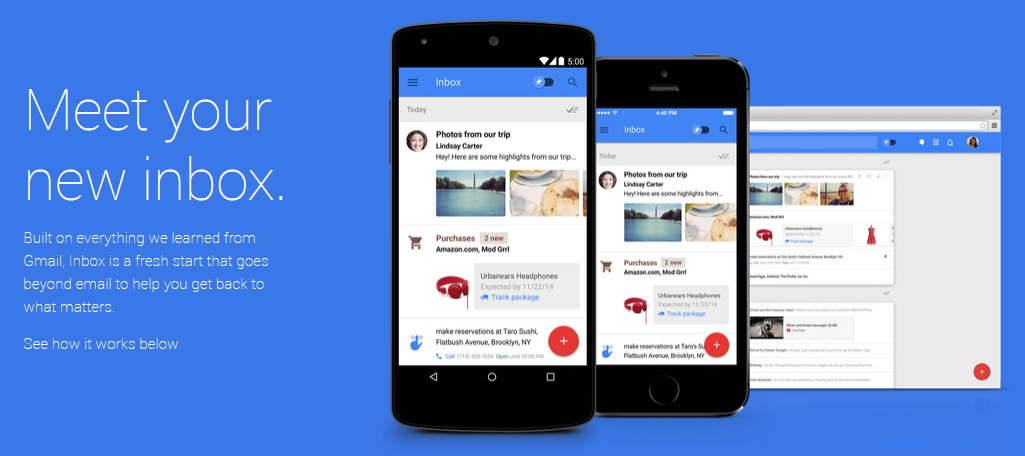
Google Inbox is more than a email handler and it can do a lot like setting reminders, tasks, flight information, item's you've or have to purchase. You can swipe them 'right' to move to archive or 'left' them to snooze for a period. All emails are also in Card format so, you don't have to switch over tabs and tabs and it is replaced by 'Bundles'.

Of course, some designs and function which are making inbox more productivity and helps us to save our time by boosting our managerial skills. They Are :

1 : Reminder :

Google added up a reminder functionality in Inbox. It's treated as email although where you can swipe them 'right' to move to archive or 'left' them to snooze for a period. The best thing with reminders are 'ASSIST' functionality, which will work for you in scheduling your reminders. Whenever you get an event or book a ticket it automatically planned with Inbox, if you have ordered something online then it will added up in reminders.


Screenshot left: Reminder Panel, right: Landing Panel

2 : Highlights :

This is something which makes Inbox best in all of them. It shows highlights so that,you don't have to search thoroughly to find an email.
Suppose your dad send you your fee receipt, then Inbox creates a card  With the subject an one click link to that attachment. Same as for travel plans and finance. 
You can turn your email into Highlight by 'Pinning' it, same as the Star functionality in old Gmail.


Left : Landing Page Highlight 'RTGS Fi', Right : Pinned Mails

3 : Bundles :

Bored of tabs. It's been 1 year since Gmail launched its Tab functionality, to categories and sort some of mails and its worked beautifully. Now the new thing about 'Bundles' are that they are more intelligent.
With them a group of mails got compiled in one, and the way of compiling them is so smart that you can get your tickets, finance summary, receptions, bookings easily.

You don't have to manage things, Google Inbox will do that for you.

As We Have Told You We're Having Few Extra Invitations. So, Do Hurry Before it Runs Out.

Left : Bundle Menu, Right : Bundled Mails
#Google
#Inbox

Dying for Invites to Google Inbox : Wait Over Here

Post By - Tanmay | 11/05/2014 01:36:00 pm
Begging for Google Inbox Invites, you've tried to ask every user there on your Facebook and Twitter profile. Oh, no one helps you, sadly.
Happy Hours Begins Guys. Google ( as said in a tweet recently by Inbox ) will hand over you a free dazzling Google Inbox Invite. All you have to do is "Send them an email at inbox@google.com".


Google Inbox team twitted that "Send us an email at inbox@google.com between 4:30 to 5:30 AM and you'll get your invite by 6:30 AM".


So now be happy with "Inbox Happy Hours", your morning could start with some new experiences, in case if you drop your night today.

After getting invitation you will need to download inbox app from Here.

Tuesday, 4 November 2014

Google Inbox Review : Latest App Is Gmail’s Sorting Tabs On Steroids

Post By - Unknown | 11/04/2014 10:00:00 am


Hello Everyone,
As with many Google products, Inbox asks that you log in with your account upon start up. When we tested the app on iOS, we were prompted with accounts to choose from since we had G-Mail installed already. Once logged in, the difference between a traditional email app and Inbox is unmistakable. This picture says it all.


We consider email the original and only universal social network. In fact, We've used all the tech pundit cliches about email, and believed them.
I have to admit that after one of my friend invited me to Inbox, I just intended to "use" Inbox.


But after Inbox  proved perfectly reliable, and after people discovered that it's somehow even easier to un-archive, un-delete and search for filed away messages than in Gmail itself, I came to trust Inbox.
More than that. I began to prefer Inbox over regular Gmail, and then even more than Mailbox (which helped pioneer some of the gestures you're using). Now, one can  feel addicted to you (Inbox).
The reason is some combination of visual appeal, mental clarity about what's going on and super ease of use.
Developers  say design is about how you (Inbox)  make people feel. And its design makes us feel warm and fuzzy all over.

Inbox is-- a cross between email, a to do list and Google Now, with an extra helping of search, geofencing, snoozing and other cool tricks.


The Material Design of Inbox is so easy to look at. Not only are reminders integrated into the email system, the email system itself is treated like to-do items. When it is done with either an email or a reminder, it doesn't feel like it is deleting email. It feels like it is checking off a to-do item or filling something away for later.


.
What this picture can’t say is how fluid using the app feels. Bright colors and clever loading indicators showcase the iconic Google colors. Though surprisingly, entering the red colored social section or orange colored updates area doesn’t provide a matching header, but displays gray instead. A bit more boring than we hoped. Though it’s a small thing to nitpick when this is the first experience many will have with Google's Material Design -- especially on the iOS side.
Though we do wish Google would start to use the swipe-right-to-go-back gesture that nearly all iOS apps take advantage of nowadays. Swiping right on a message marks it as Done for those ambitious enough to attempt reaching Inbox Zero. 

The Google Inbox app shows that despite having the best email product, the Gmail team continues to iterate and make it better. Some clear additions to the next version of Inbox should include a full-fledged iPad version and an Undo button similar to what’s available in Gmail. Despite small quibbles, Inbox provides an attractive front-end to Gmail. We would have preferred to see better conformity between Gmail and Inbox in regards to pins vs. stars, snooze settings carried over and the option of undo-ing a sent email. But judging by Google’s Inbox invite process, the app still has a few kinks to work out. Even with these minor problems, Google Inbox proves a worthy replacement of the default Gmail experience.


Get your Inbox invite here-- Google Inbox

Wednesday, 8 October 2014

,

Google Glass : View it on your Laptop ( your smart phone also )

Post By - Tanmay | 10/08/2014 06:14:00 am
glasssssssss

So, This is our first “How To”, which will let you view your android wear or  phone screen on laptop or projector. Let’s talk about Google Glass first and its arch.
Google Glass is a wearable technology by Google with an mounted display and works on Google Platform. Basically it’s a smart phone which works on android an ready to do any work on your voice command. Having a touch panel and one hard key prepares it to use. The technology or app used in Google Glass is known to be Google Cards.
Some Setup will lead us to project Google Glass Screen on your laptop. You can do it either by wifi or cable though I prefer to use wifi.
1 – Download ADB and ASM and Android SDK ( You’ll get from Google Dev )
2 – Put it into C:\ADT-BUNDLE*\SDK\PLATFORM-TOOLS
3 – Now Turn on Debug Mode in Phone or Glass.
For Glass - 
 Turn on Glass. and swipe your finger towards head until you get setting card.
 Tap the touch pad to enter in setting card.sasdsasdad 
Swipe towards front of your head until you get device info card then enter.
sdkadjbasdkjsa 
Swipe towards front until you got Debug Mode
SAasSAsSasAASDA 
You’ll see turn debug mode on. Tap your pad on that.


Now, Head to C:\ADT-BUNDLE*\SDK\PLATFORM-TOOLS and press Shift + Right Mouse Click –> Open Command Window Here


For Wi-Fi :


  1. In ADB, run adb shell netcfg


  2. To access ADB open port 5555:  adb tcpip 5555


  3. To connect your ADB via TCP, execute : adb connect <IP FROM STEP-1>


Now as you done all the steps for wifi, for cable you doesn’t need to do all of these. just open Command Prompt at location your ADB is and type

    
4. To access ADB Shell : adb shell
Now Turn Your ASM.jar on
Abbreviations :
ADB : Android Debug Bridge, helps us to transfer control of android devices on Laptop or PCs. You can search for more ADB Shell Command by Googling it.

ASM : Android Screen Manager, To show your Android device’s screen on Laptop. There are another alternatives suitable in case you need better frame rate.


Try it with your smart phone just on the Debugger mode from Developer tools and that’s it. (In case there is no Developer tool in KitKat 4.4 Press Build for 10 Times exactly to turn it on ).

Saturday, 4 October 2014

Google is to take on Whatsapp and other apps with its brand new messenger

Post By - Tanmay | 10/04/2014 02:26:00 pm

If you buy a smart phone, then what will be the first thing you are supposed to install ? Yes we are talking about messengers. We have a lot of messenger in the list as Hike, Whatsapp, Kik, Line, but how we choose them, tough decision hmmmm. So there will be again a little more competition. As lately, the news came that Google is going to launch it’s own messenger which wouldn’t even require your Google Account login information.

Apart from these, BGR report says that it will be separate from Hangout completely.

If we talk about the big bidding in messenger app between Google and Facebook, where Google makes a 10$ Billion offer to Whatsapp, which is bought by Facebook  in $19 Billion. This loss costs Google more than $19B and now Google is far behind than these companies in the matter of social messaging.

As the image from The Economic Times shows there are 600 Million user of Whatsapp worldwide in which, 60 Million customers of India are being served. It’s matter how this Google app is going to be popular in India.

#AllTheBestGoogle

Technorati Tags: ,,

Sunday, 14 September 2014

Google Launched Person Finder and Crisis Map for Flood-hit J&K

Post By - Tanmay | 9/14/2014 12:38:00 am
As the flood-hit J&K, Google launches it's Crisis map and Person Finder to help rescue team to get thousands of them out.


Google introduced Crisis map with updated data for J&K supposed to help authorities and  family members to search for their lost ones.
Provided link http://google.org/crisismap/2014-jammu-kashmir-floods which can also be viewed on social media by sharing or another blogs by embedded button. Google gives a statement about "We hope the crisis map can accelerate the efforts of responding agencies and people affected by disaster. We continue to work on providing more relevant tools for rescue agencies, volunteers and non-profits "
The Crisis Map also contains data for Australia Fire, US Wildfire etc.


Same, Google also launches its person finder tool here - https://www.google.org/personfinder/2014-jammu-kashmir-floods/  the Tool allows people and individuals to share their status or find someone affected by disaster by giving their details.
Tool is available in Hindi and English for more convenient and it can be also embedded on any website using following code.

We hope the crisis map can accelerate the efforts of responding agencies and people affected by the disaster. We continue to work on providing more relevant tools for rescue agencies, volunteers and non- profits,” -
<iframe src="http://google.org/personfinder/2014-jammu-kashmir-floods/?ui=small" 
width=400 height=300 frameborder=0 style="border: dashed 2px #77c"></iframe>

You can also send SMS to give or get information about person by sending

 Search <person-name>  to 9773300000 eg. Search Abdul Qadir

We are also providing some numbers to contact as information of the Army, Home Ministry, and NDRF Control Room, Emergency Army Helpline:(+91) 011-23019831 Home Ministry
Helpline:(+91) 011-23093054 · (+91) 011-23092763 NDRF Control Room:(+91)
 011-26107953 · (+91) 0-971107.

Here in Lovely Professional University, We are driving a J&K Flood Relief Donation. Kindly donate and show your helps towards people affected by disaster.

Friday, 12 September 2014

Gmail: Don’t worry, Check Public Access of Your Account Here

Post By - Tanmay | 9/12/2014 05:55:00 am

Gmail, most reliable email service which we have using since far. But the latest news says as it was also been a target of 5m Google account breach. So, are you worried ? Yeah you should be, may be you are one of them whose credentials are compromised.
So, Here is how to find out if your Id and Password are public or not.


gmail


Head right now to –> http://isleaked.com

Write your Gmail address in the box in front of you and do click on Check it!! . If your account was leaked in the breach then site will confirm and show you the first two character of your password and if you don’t want to give your complete profile. It also provides you the facility to replace 3 Character with asterisk sign.

And, Account Exposed….??

Either yes or No….. Move your head towards  https://www.google.com/settings/personalinfo

Change your password immediately under security tab and apply 2-Step Verification. It’s so easy and it’s under same security tab. 2-Step verification will allow user to confirm a Security Code by 2 means either by SMS System or by Android Application Authenticator. It helps you to keep your credentials secure.